
999V Deposit and Withdrawal Guide
Learn how to manage your 999V Game balance with simple deposit and withdrawal steps. Follow the instructions below and always check the payment details and transaction status before confirming.
999V Deposit Guide: Step by Step in 2026
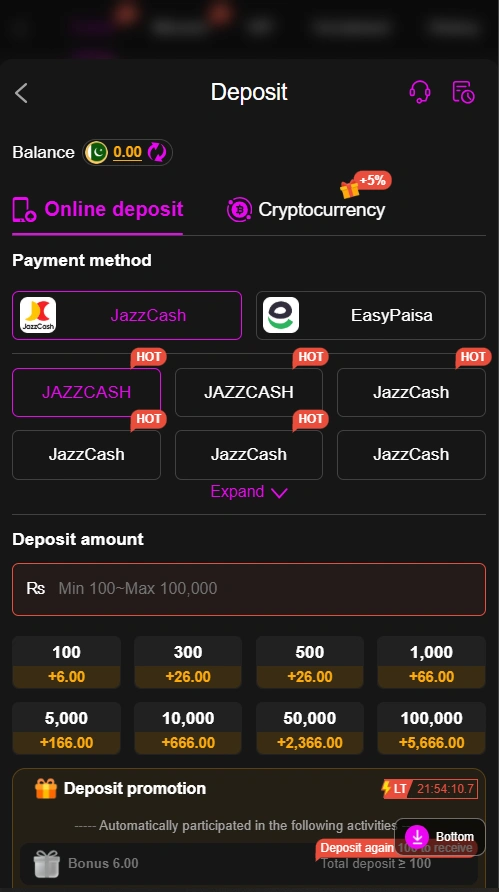
- Log In: Open your 999V account and enter your registered login details.
- Open Deposit: Go to the Wallet or Deposit section from the main menu.
- Choose Payment Method: Select an available option such as Easypaisa or JazzCash. The available methods can vary, so follow the options currently displayed in your account.
- Enter Amount: Type the amount you want to deposit and check the minimum and maximum limits shown on the payment page.
- Check Payment Details: Carefully review the wallet number or payment information displayed inside the current 999V deposit section.
- Complete Payment: Open your selected wallet, enter the required details, and confirm the transaction using your wallet’s normal security process.
- Keep Transaction ID: Save the transaction reference or confirmation message until your 999V balance has been updated.
- Check Your Balance: Return to 999V and check the wallet section to confirm that the deposit has been credited.
- Contact Support: If your payment was successful but the balance does not update, keep your transaction ID and contact the platform’s support team.
How to Withdraw Money from 999V?
- Login to 999V: Open the app and sign in to your registered account.
- Open Withdraw: Go to the Wallet or Withdraw section from the main menu.
- Select Payment Method: Choose an available option such as Easypaisa, JazzCash, or bank transfer.
- Enter Amount: Type the amount you want to withdraw and check the current minimum withdrawal requirement.
- Add Correct Details: Enter your payment account number carefully. Incorrect details can cause delays or failed transactions.
- Review Request: Check the withdrawal amount and payment information before submitting.
- Confirm Withdrawal: Enter any required withdrawal password, PIN, or verification code and submit the request.
- Wait for Processing: Keep your transaction or withdrawal reference until the request has been completed. Processing times can vary.
- Check Your Wallet: Once processed, check your Easypaisa, JazzCash, or bank account for the incoming payment.
- Contact Support: If the withdrawal remains pending or the amount does not arrive, contact 999V support with your transaction reference instead of submitting the request repeatedly.